Why does a one-year SSL certificate need to be reissued every few months?

One year is the SSL service term you purchased. Your browser shows when the certificate currently installed on your website expires, while your service renewal date is based on the order date shown in the client area. Shorter SSL certificate validity periods help improve domain security. For example, when a domain is transferred to a new owner, SSL certificates previously obtained by the former owner do not automatically become invalid. Shorter validity periods reduce the time those old certificates remain valid before expiring, lowering the risk of misuse.

The maximum lifetime depends on the issue date: 200 days from March 15, 2026, 100 days from March 15, 2027, and 47 days from March 15, 2029. The recommended ceilings are 199, 99 and 46 days respectively, and a certificate authority may issue a shorter certificate. Read the WPoki guide to SSL validity and replacement (Chinese)

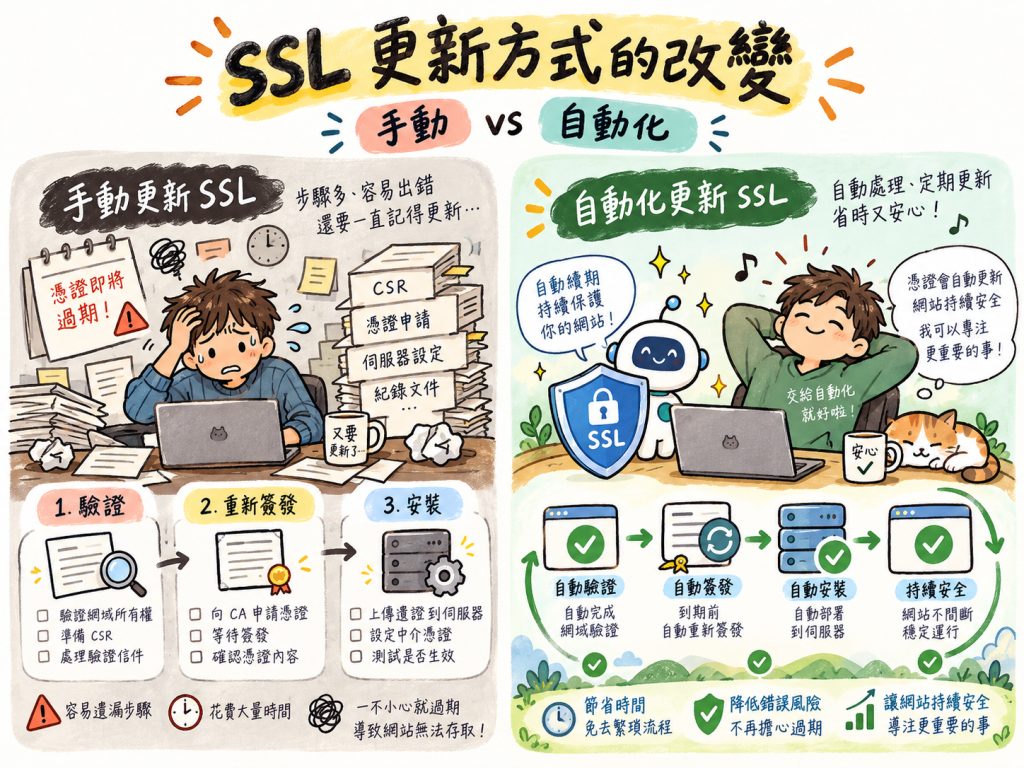
When both your hosting and SSL are with ServerZoo and enrolled in ACME management, the system validates the domain, renews the certificate and installs it before the old one expires. Even with several replacements in one service year, you do not have to place individual orders or install each certificate, reducing the risk of expiry warnings for visitors.

SSL certificates are not eligible for a cooling-off period. Please double-check the spelling of the domain for your SSL certificate before submitting your order.

Single-Domain SSL or Wildcard? Choose Based on the Number of Websites

If you only need to protect a single website address, you can choose a single-domain SSL certificate. If your business uses multiple subdomains, such as www.example.com for your official website and shop.example.com for your online store, you can choose a Wildcard certificate to protect multiple subdomains at the same level under the same domain with a single certificate.

Will ServerZoo help install my SSL certificate after purchase?

If you purchase both your web hosting and SSL certificate from ServerZoo, ServerZoo will install the SSL certificate on your hosting account, so you do not need to handle the complex certificate installation process yourself. If your website is hosted with another provider, you can still purchase an SSL certificate from ServerZoo, but your own team will need to handle the installation.

As SSL Certificate Validity Periods Get Shorter, Do I Need to Handle Renewals Myself?

ServerZoo has implemented ACME automated certificate management. If you purchase both hosting and SSL from ServerZoo, your SSL certificate will be automatically reissued and installed before it expires. Even with shorter validity periods for individual certificates, you will not need to update them manually each time.

Check the installed certificate

Free SSL Installation*

*Only available with our shared hosting
Enhance website security


SSL-A
Affordable, easy to use, and from an established brand
$998 /year


SSL-B
The Smart Choice
$2100 /year


SSL-C
Widely accepted by banks and payment gateways
$3150/year


SSL-Wildcard
SSL for Unlimited Subdomains
$4690/year
Who It's For Personal and small websites Small Businesses or E-commerce Medium-sized businesses or electronic Need SSL for Unlimited Subdomains
Domain Support One One One One primary domain + unlimited subdomains
Browser Support 99.9% 99.9% 99.9% 99.9%
Dynamic, Clickable Certificate Seal Yes. Builds visitor trust. Yes. Builds visitor trust. Yes. Builds visitor trust. Yes. Builds visitor trust.
Encryption Strength 256 bit SHA-2 256 bit SHA-2 256 bit SHA-2 256 bit SHA-2
Installation Service Free Installation* Free Installation* Free Installation* Free Installation*
*Note Free installation is available only if you also purchase your hosting from us. You are welcome to purchase our SSL certificates for hosting with another provider, but you will need to install them yourself.
Buy Now Order Order Order Order

How does SSL protect data for website logins, forms, and online payments?

When visitors log in to their accounts, submit inquiry forms, or check out online, an SSL certificate enables HTTPS encryption of data transmitted between their browsers and your website. This reduces the risk of passwords, personal information, and transaction data being stolen or altered in transit. The browser also checks whether the SSL certificate matches the domain of the website being accessed, helping visitors establish a secure connection. Please note that SSL primarily secures data in transit. Once data reaches your website, member data and order information still need to be protected through administrative account permissions and system security management.

Browser window and shield representing website protection

Is one SSL certificate enough for an official website, online store, and subdomains?

Before purchasing an SSL certificate, we recommend listing all website URLs that need HTTPS protection, including your official website, online store, membership system, and old URLs that redirect automatically. For example, www.example.com and shop.example.com can be protected by the same Wildcard certificate for *.example.com. Before purchasing, we recommend confirming the full URLs of all websites that need protection and choosing a suitable single-domain or Wildcard SSL certificate. This helps avoid discovering after installation that some websites are not covered.

Browser window and shield representing website protection

How can I confirm that my website is working properly after my SSL certificate is reissued?

After renewing and installing your SSL certificate, we recommend opening your website in a browser to confirm that the HTTPS connection works properly, then checking the domains covered by the certificate and its new expiration date. In addition to checking the homepage, you should test member login, contact forms, the shopping cart, and online checkout to ensure that essential website functions are not affected. If the homepage opens normally but some features do not work, check whether the page is still loading images, JavaScript, or other external resources over HTTP. Browsers may restrict this type of mixed content, which can affect website functionality even when the SSL certificate itself is valid.

Browser window and shield representing website protection

When purchasing an SSL certificate, also check how future reissuance and installation will be handled

When purchasing an SSL certificate, compare not only prices and certificate types but also clarify who will handle subsequent renewals and installation. Automated management is becoming especially important as the validity period of individual SSL certificates is gradually shortened. If both your hosting and SSL certificate are purchased from ServerZoo and enrolled in ACME automated management, the system will automatically reissue and install the certificate before it expires, reducing manual work. If you purchase only the SSL certificate from ServerZoo but host your website with another company, you or your hosting provider must install the new certificate after it is reissued. If you use ServerZoo shared hosting but purchase your SSL certificate from another provider, you must arrange for reissuance with that certificate provider and then install the new certificate on your hosting account yourself.

SSL selection and installation FAQ

What do the dates on your order, in your browser and in a renewal notice mean? Find out who handles validation and installation when hosting and SSL come from different providers.

How should I choose between free and paid SSL?

Before purchasing an SSL certificate, we recommend listing all website addresses that need protection, such as example.com, www.example.com, and shop.example.com, then choosing the appropriate certificate type for your needs. If you need to protect multiple subdomains under the same primary domain, consider a Wildcard SSL certificate. If your website uses different primary domains, you can purchase separate single-domain SSL certificates or consider an SSL certificate plan that supports multiple domains. Please note that even if multiple domains point to the same website, a single-domain SSL certificate does not necessarily cover them all. The coverage of an SSL certificate depends on the domain names specified in the application. Once the certificate has been purchased, the covered domains cannot be changed at will. We recommend checking all website URLs before purchasing to avoid choosing the wrong certificate type and having to apply again.

Discuss your needs with support

Can an SSL certificate prevent hackers from compromising my website?

SSL certificates primarily protect data transmitted to and from your website; they cannot completely prevent hacking. An encrypted HTTPS connection helps reduce the risk of account passwords, personal data, and transaction information being stolen or tampered with during transmission. However, even with an SSL certificate correctly installed, you still need to regularly update your website software, WordPress plugins, and themes, use secure login credentials, set appropriate access permissions, and perform regular backups. SSL protects data in transit, while website security requires multiple measures working together to effectively reduce the risk of attacks and data breaches.

Which certificate do I need for multiple domains or subdomains?

First, list the domain names you actually use, such as example.com, www.example.com, and shop.example.com, then confirm the certificate's coverage. Wildcard certificates are suitable for subdomains within a specified scope. For different primary domains, check the available individual or multi-domain certificate options.

Pointing several names to one site does not make a single-name certificate cover them all. Confirm names before ordering; they cannot be freely changed afterward.

Discuss your needs with support

What should I check when moving SSL between Linux and Windows hosting?

Before scheduling a migration, please confirm the new hosting environment, domain, and certificate installation method. If an SSL certificate has already been purchased and installed and needs to be reissued before expiration because of a change in hosting environment, a fee of NT$1,050 per reissuance applies.

NT$1,050 is the SSL certificate reissuance service fee, which is separate from hosting reset or backup restoration fees.

Discuss your needs with support

Why does the SSL expiry date differ from a one-year service term?

Suppose you purchase a one-year SSL service in month 4 of 2026, but your browser shows that the certificate expires in month 10 of the same year. Both dates can be correct. The browser shows the validity period of the certificate currently in use on your website, while the dates on your order in the ServerZoo client area indicate the SSL service term you purchased.

CA/Browser Forum certificate validity rules

Can I buy SSL from ServerZoo for a site hosted elsewhere?

Yes. After purchasing an SSL certificate from ServerZoo, please follow the notification instructions to complete any domain validation steps that require your participation. Once we receive the SSL CODE, we will provide it to you for installation by you or your external hosting administrator. We recommend confirming in advance who will receive notifications, who can log in to the server, and who will check that the SSL certificate is active after installation.

Discuss your needs with support

What should I verify before ordering SSL?

Please verify the domain that will actually use SSL, including www and any subdomains, the certificate's coverage, and the server where it will be installed. SSL certificates are not eligible for a cooling-off period, so make sure the certificate you are purchasing meets your needs before submitting your order. Do not choose based solely on price or assume you can freely change the domain later.

What should I check after SSL installation?

Open the website address you actually use and check the certificate's validity period, hostname match, and trust validation, then test the login, form, and checkout pages. If pages still load images or scripts over HTTP, your website maintenance team will need to update them. Installing the certificate does not mean the entire website has been fully validated.

Check your SSL certificate

Why are SSL certificate lifetimes getting shorter?

Shorter SSL certificate validity periods are primarily intended to improve website connection security and reduce the risk of old certificates being misused. For example, when a domain is transferred to a new owner or a website administrator changes, the existing SSL certificate does not automatically become invalid. If someone else still holds the old certificate and its corresponding private key, there may be a risk of misuse until the certificate expires. Shorter SSL certificate validity periods reduce the time that old certificates can remain in use. More frequent certificate reissuance and domain control validation also help reduce the security risks associated with using old certificates for extended periods.

When do the 199-, 99- and 46-day recommendations apply?

It depends on each certificate's issuance date. From March 15, 2026, publicly trusted website certificates have a maximum validity period of 199 days; from March 15, 2027, the certificate validity period is 99 days; from March 15, 2029, the certificate validity period is 46 days.

For example, a certificate already issued on March 14, 2027 will not suddenly have only 99 days remaining the next day. Only when it is next renewed will the new certificate's validity period follow the rules in effect at that time. You can check each certificate's actual expiration date in your browser.

Read the WPoki guide to SSL validity and replacement (Chinese)

Does a certificate expiry notice mean another annual payment is due?

First, log in to the client area and check the domain and order renewal date against the notice. If your annual service is still active, routine certificate reissuance uses the existing order; you do not need to purchase another year. If the notice requires domain validation, you must still complete it by the stated deadline so the new certificate can be issued in time. If your annual contract is also nearing expiration, renew it according to the invoice.

Who completes domain validation during a manual reissue, and what happens next?

Have someone with the necessary access complete the steps specified by the certificate authority. For example, if a DNS record is required, ask the person who manages the domain's DNS to enter the provided values. If website file validation is required, have the website administrator place the file at the specified URL so the certificate authority can access it.

Validation must be completed before a certificate can be issued. After receiving the new certificate, your server administrator must still install it and then visit the website URL to confirm that the expiration date has been updated. Even if the new certificate has arrived in your inbox, the website may still be using the old one.

What does ACME handle when both hosting and SSL come from ServerZoo?

ServerZoo has implemented ACME automated management. Once your hosting and certificate are enrolled, the system will verify domain control with the certificate authority, request a new certificate, and install it directly on your hosting account whenever the current certificate approaches expiration. Even when certificate validity changes to 46 days in the future, you will not need to place an order, upload files, or log in to the control panel to install each new certificate during your service term.

Who reissues my certificate if only the hosting is with ServerZoo?

First, contact your original SSL provider, complete validation as instructed, and obtain the new certificate and any required intermediate certificates. You or your website administrator can then install the files on your ServerZoo hosting account and open the website to check whether the expiration date has been updated. If you use Linux cPanel, follow the illustrated guide below to find where to install the certificate.

WPoki’s illustrated SSL installation guide for Linux cPanel

Topics SSL certificate, HTTPS, Wildcard SSL, certificate installation, business website

Choosing and using this service

Confirm your domain validation method before applying for an SSL certificate

SSL certificates are not ready to use immediately after payment. The certificate authority must first verify that the applicant controls the domain before issuing a certificate. Depending on the certificate type and validation method, you may need to add a DNS validation record, upload a specified validation file, or complete validation through a designated email address. If your domain’s DNS is managed by another hosting provider, we recommend confirming before purchase that you can edit the records yourself and arranging for the relevant personnel to assist with validation. If your domain has CAA records, also check that they authorize your selected certificate authority to issue certificates, to avoid issuance delays caused by validation configuration issues.

Plan installation and subsequent certificate renewal

If your website uses a CDN or reverse proxy service such as Cloudflare, SSL certificate deployment must match your actual website architecture. For example, a visitor connects to the CDN over HTTPS, and the CDN then connects to the origin server. These are two separate connections. In addition to checking that visitor-facing HTTPS works properly, you should ensure that appropriate encryption settings are used between the CDN and the origin server. If your business website uses multiple servers, we recommend identifying where SSL certificates are needed before purchasing, so you do not configure just one location while overlooking other parts of the website's connection path.

↑